Have you ever wondered why some computers start instantly while others take forever just to open a file?
The answer often comes down to the type of storage drive inside the device. When choosing storage for a computer or laptop, the debate usually comes down to SSD vs HDD. Both drives store your files, operating system, and applications, but the way they work is very different.
Understanding these differences can help you choose the right storage for speed, performance, and overall user experience. In this guide, we will explore how SSDs and HDDs work, how they compare in speed, and which one is better for your needs.
What Is an SSD?
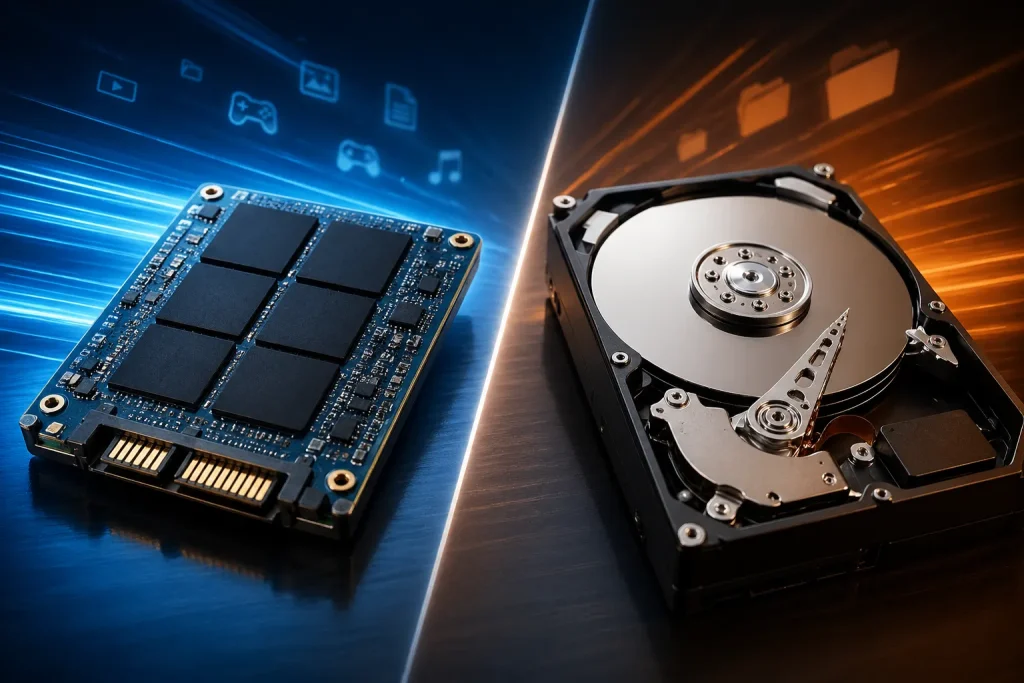
An SSD (Solid State Drive) is a storage device that uses flash memory to store data. Unlike traditional drives, it has no moving parts. This design allows data to be accessed almost instantly.
Because SSDs rely on electronic memory chips, they can read and write data much faster than older storage technologies. This is the main reason modern laptops and high performance computers often use SSDs.
Key Features of SSD
- Very fast data access and file transfer
- No moving parts, which improves durability
- Lower power consumption
- Quiet operation
- Lightweight and compact design
SSDs are widely used today in laptops, gaming computers, and even smartphones because speed plays a huge role in user experience.
What Is an HDD?
An HDD (Hard Disk Drive) is the traditional form of computer storage. It stores data on spinning disks called platters. A small mechanical arm moves across the disk to read and write information.
Because HDDs rely on moving parts, accessing data takes more time compared to SSDs. However, they have been used for decades and are still popular because they offer large storage capacity at a lower price.
Key Features of HDD
- Lower cost per gigabyte
- Large storage capacity available
- Suitable for storing large files like videos and backups
- Well established and widely compatible
Although slower than SSDs, HDDs are still useful for users who need a lot of storage without spending too much money.
| Feature | SSD (Solid State Drive) | HDD (Hard Disk Drive) |
|---|---|---|
| Speed | Very fast read and write speeds | Slower because of spinning disks |
| Boot Time | System starts in 10–20 seconds | System startup can take 40–60 seconds |
| Data Access | Instant data access | Slower due to mechanical movement |
| Durability | More durable with no moving parts | Less durable because of moving components |
| Noise | Completely silent | Can produce noise from spinning disks |
| Power Consumption | Uses less power | Uses more power |
| Weight | Lightweight and compact | Heavier and larger |
| Storage Capacity | Commonly 256GB to 2TB | Commonly 1TB to 10TB or more |
| Price | Higher cost per GB | Lower cost per GB |
| Best Use | Operating systems, gaming, fast performance | Large storage, backups, media files |
Speed Comparison
Speed is where the difference becomes very clear.
Boot Time
Computers with SSDs can start in about 10 to 20 seconds, while HDD based systems may take 40 seconds or more.
File Transfer
SSDs can transfer files several times faster. Large files such as videos or games copy much quicker compared to HDDs.
Application Loading
Programs and games open faster on SSDs because the drive can access data instantly. HDDs must wait for the spinning disk to reach the correct position.
In simple terms, if speed and responsiveness matter, SSDs offer a noticeable improvement.
Performance in Everyday Use
Storage type affects many everyday tasks.
Opening Programs
Applications launch almost instantly on an SSD. On an HDD, you may notice delays.
Multitasking
SSDs handle multiple tasks better because they can process many data requests quickly.
Gaming
Games installed on an SSD load faster and reduce waiting times between levels.
System Updates
Operating system updates install quicker on SSD based computers.
When comparing ssd vs hdd, the performance advantage clearly belongs to SSDs, especially for daily computer use.
Durability and Reliability
Durability is another important factor.
SSD Reliability
Since SSDs have no moving parts, they are less likely to fail due to physical movement or accidental drops. This makes them ideal for laptops.
HDD Reliability
HDDs contain spinning disks and mechanical components. These parts can wear out over time or get damaged if the device is dropped while running.
Although both drives can last many years, SSDs are generally considered more durable.
Storage Capacity
HDDs still have an advantage in storage size and affordability.
Typical SSD Capacity
Most consumer SSDs range from 256GB to 2TB, though larger options exist.
Typical HDD Capacity
HDDs can easily reach 4TB, 8TB, or even more, making them suitable for large media collections.
For users who store many movies, photos, or backups, HDDs remain a cost effective option.
Price Differences
Price often influences the decision.
- SSDs are more expensive per gigabyte
- HDDs are cheaper and offer more storage for the price
However, SSD prices have dropped significantly in recent years. Many computers now include SSDs as the primary storage drive.
Power Consumption
SSDs consume less power than HDDs. This can make a difference in laptops.
Benefits include:
- Longer battery life
- Less heat generation
- Quiet operation since there are no moving parts
HDDs use more power because the disks must constantly spin during operation.
When Should You Choose an SSD?
An SSD is the best choice if you want:
- Faster system startup
- Quick application loading
- Better gaming performance
- Improved laptop battery life
- A smoother computing experience
For most modern users, SSDs provide the best balance of speed and convenience.
When Should You Choose an HDD?
An HDD may be the right option if you need:
- Large storage capacity
- Affordable storage for backups
- A secondary drive for storing large files
- Media storage such as movies or photos
Many users combine both drives, using an SSD for the operating system and an HDD for extra storage.
Final Thoughts
Choosing the right storage drive can significantly impact your computer’s speed and performance. While both drives serve the same purpose, their technology leads to very different results.
SSDs deliver faster performance, quicker startup times, and a smoother overall experience. HDDs remain useful for storing large amounts of data at a lower cost.
In most situations today, an SSD is the better choice for everyday computing. However, pairing it with an HDD can give you the best of both worlds: speed and storage capacity.